idraft by goo 文章作成・校正・文字数カウント1.2.37
Publisher Description



A sentence creation application that combines a dictionary, editor, and character count. As a text editor for writing novels, document creation (writing), and as a notebook. When writing blogs and scenarios
[Sentence creation app created by goo dictionary - idraft by goo]
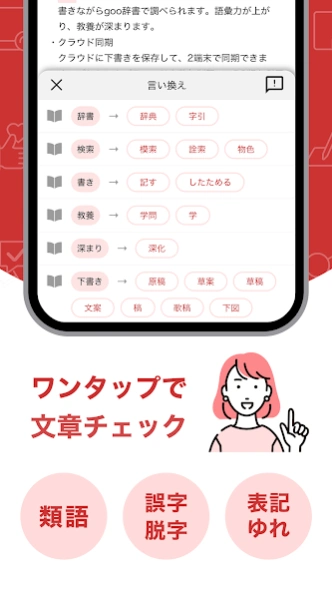
Check synonyms, spelling errors, and spelling variations with one tap
◆ You can close the goo dictionary while writing, so you can concentrate on writing
◆Variety of functions to speed up writing (dark mode, character count, etc.)
You can write anytime, anywhere with cloud synchronization
◆ "goo dictionary" with 50 million page views per month is provided
◆ Operated by the reliable NTT Group
[What is idraft by goo]
・"idraft by goo" is a writing application made by goo dictionary.
・Convenient functions of "dictionary", "proofreading", "synonym", "text editor", and "character count" are all in one.
Recommended for various "writing" activities such as novels, columns, and essays.
1. I can't concentrate on "writing" work!
→ If you use the built-in goo dictionary, you can complete your writing within the app and cut off the temptation of the internet.
2. I can't write good sentences!
→Since you can check for misspellings, synonyms, and spelling variations, you can easily create higher quality sentences.
3. Not enough time to write!
→ Cloud synchronization enables writing in various situations. Increase work efficiency.
[Convenient points of idraft by goo]
1. Look up in goo dictionary while writing
While making sentences, you can look up the meaning and usage of words in the goo dictionary. National words, synonyms, kanji, four-character idioms, etc. can be searched immediately from the writing screen.
・Shogakukan "Digital Daijisen"
・Shogakukan “Thesaurus Illustrative Dictionary New Edition”
・ Gakken “Emotional Word Selection Dictionary” *Premium plan
・ Gakken “Dictionary for Selecting Scene Words” *Premium Plan
・ Gakken “Japanese emotion word selection dictionary” * Premium plan
・Japan Kanji Proficiency Test Association “Kanjipedia”
・Gakken "Four-letter idiom dictionary"
・Shogakukan "Progressive English-Japanese Chinese Dictionary 5th Edition"
・Shogakukan "Progressive Japanese-English-Chinese Dictionary 4th Edition"
2. "Paraphrase" to acquire vocabulary and expressiveness
Paraphrases and synonyms are displayed with one tap, and you can search for expressions that suit you.
3. "Correction of spelling mistakes" that makes sentences easier to read
You can correct misspellings of words that are easy to make mistakes, such as empty words and duplicate expressions.
4. "Proofreading of spelling variations" that improves the completeness of sentences
You can correct notation variations such as "understand", "understand", "can", and "can".
5. Write anytime, anywhere with cloud storage
Drafts can be saved in the cloud and edited anytime on your phone or tablet.
[Main functions]
・Draft writing
・Dictionary search
・Dictionary search condition settings (prefix match, exact match)
・Proofreading function (spelling errors and notation variations)
・Paraphrase function (suggest synonyms)
・Format checker (checks the writing style of sentences and symbols according to the prescribed rules)
・Quick keyboard (quickly enter symbols and brackets)
・Range specification function for paraphrasing, proofreading, and searching
・Folder creation function
・Folder sorting function (creation date ascending/descending order, title ascending/descending order, update date ascending/descending order)
・Cloud save function for drafts and folders
・Draft auto save, auto save
・Manual saving of drafts
・Draft character count
・Draft sort function (title ascending/descending, update date ascending/descending)
・Character size change function
・Font change function (Gothic, Mincho)
・Undo/Redo function
・Draft text copy function
・Move and delete drafts
・Search for text in drafts
・Creating and editing documents offline
・ Supports horizontal screen
・Dark mode support (main screen, Android 10 or later)
・Dashboard function (recording number of characters, recording date of writing)
・SNS sharing (Twitter, Facebook, Evernote, etc.)
[Premium plan introduction]
idraft is a basic free app, but if you register for the premium plan (200 yen per month, free for the first month only), you can use the following.
・PC browser version (Windows, Mac compatible)
・Three volumes of the “Word Selection Dictionary” series (emotion word selection dictionary, scene word selection dictionary, Japanese emotion word selection dictionary), which are ideal for creative thesaurus, can be used to increase the number of paraphrase candidates.
・Unlimited number of devices that can be synchronized
・No ads
・Draft backup and restore
- In the novel writing mode, format the writing style suitable for the novel, check the writing style of your choice
・Customize quick keyboard
・Registration and input of fixed phrases
・Character replacement function (one by one, all together)
・Sort drafts manually (drag)
- Rearrange folders manually (drag)
・"Last match", "partial match", and "include in description" have been added to the dictionary search conditions.
・Maximum number of drafts and folders is 10,000 each
[idraft by goo is recommended for these people]
・I'm writing a novel as a hobby, so I'm looking for an app that can be used as a writer and editor.
・ I'm looking for an app that can count typos and characters for writing work
・I want to concentrate on writing sentences, novels, letters, etc., so I'm looking for an editor app that can be used offline or can look up dictionaries in the app.
・I'm looking for an app that I want to use to easily create documents and letters on my smartphone, and that also checks for spelling errors and spelling variations.
・ Those who want to write on a smartphone because it is troublesome to write blogs and scenarios on paper
・I'm looking for an editor app that can be used as a notebook or memo pad for work or school
・ GooID login (free registration) is required to register for the premium plan. gooID is an ID for using various services provided by goo.
・Premium plan is a monthly subscription service. If your Google account is charged and not canceled 24 hours before the renewal date, your registration will be automatically renewed and a monthly fee of 200 yen will be charged.
・If you are registering for the premium plan for the first time, payment will not be made immediately after registration, but will be made automatically after the free trial period ends.
・You can cancel your registration at any time. Please follow the procedure from "Profile Icon" → "Payment & Subscription" → "Subscription" in the Google Play app. You can also check the price and renewal date in "Subscription".
・To use the PC browser version, access the following URL from your PC and click "Login".
https://dictionary.goo.ne.jp/info/app/
◆ Recommended operating environment
・App version
Android version 6 or higher
*Dark mode is version 10 or later
・PC browser version (premium plan)
[OS] Windows 10, Windows 11, macOS Big Sur, macOS Monterey
[Browser] Google Chrome latest version, Safari latest version (macOS only)
◆Terms of use
https://dictionary.goo.ne.jp/info/idraft/term.html
◆Contact us
If you have any comments or requests for this app, please contact us below.
https://help.goo.ne.jp/cc/app/m/163700/
◆ goo dictionary
https://dictionary.goo.ne.jp/
◆Latest information
Please check the official Twitter for the latest information on idraft by goo.
https://twitter.com/idraft_goo
About idraft by goo 文章作成・校正・文字数カウント
The company that develops idraft by goo 文章作成・校正・文字数カウント is NTT DOCOMO. The latest version released by its developer is 1.2.37.
To install idraft by goo 文章作成・校正・文字数カウント on your Android device, just click the green Continue To App button above to start the installation process. The app is listed on our website since 2025-03-05 and was downloaded 6 times. We have already checked if the download link is safe, however for your own protection we recommend that you scan the downloaded app with your antivirus. Your antivirus may detect the idraft by goo 文章作成・校正・文字数カウント as malware as malware if the download link to jp.ne.goo.dictapp.pro is broken.
How to install idraft by goo 文章作成・校正・文字数カウント on your Android device:
- Click on the Continue To App button on our website. This will redirect you to Google Play.
- Once the idraft by goo 文章作成・校正・文字数カウント is shown in the Google Play listing of your Android device, you can start its download and installation. Tap on the Install button located below the search bar and to the right of the app icon.
- A pop-up window with the permissions required by idraft by goo 文章作成・校正・文字数カウント will be shown. Click on Accept to continue the process.
- idraft by goo 文章作成・校正・文字数カウント will be downloaded onto your device, displaying a progress. Once the download completes, the installation will start and you'll get a notification after the installation is finished.
Program Details
System requirements
Download information
Pricing
Version History
version 1.2.37
posted on 2025-03-05
「idraft by goo」は2025年3月27日(木)をもちまして、サービスを終了することとなりました。
多くのお客さまにご利用いただきましたこと、深く御礼申し上げます。
■今回の変更点
軽微な改修を行いました。
version 1.2.35
posted on 2024-11-21
「idraft by goo」は2025年3月27日(木)をもちまして、サービスを終了することとなりました。
多くのお客さまにご利用いただきましたこと、深く御礼申し上げます。
■今回の変更点
idraftのプレミアムプランの新規受付を停止しました。
軽微な改修とパフォーマンス改善を行いました。
version 1.2.34
posted on 2024-08-20
gooIDのセキュリティ強化を目的として、goo会員情報の閲覧・変更を行う際に、ご本人確認のためにgooIDに登録済みの電話番号またはメールアドレスを使った認証(2段階認証)が必要になります。
■idraftアプリ内で2段階認証が必要なケース
・メニューより「アカウント情報」を閲覧する
・プレミアムプランに登録する
引き続き、idraftをよろしくお願いいたします。
version 1.2.33
posted on 2024-06-05
軽微な不具合修正とパフォーマンス改善を行いました。
引き続き、idraftをよろしくお願いいたします。
version 1.2.32
posted on 2024-02-09
パフォーマンス改善を行いました。
・ダッシュボードの文字数グラフの最大値をユーザー自身で設定できるようになりました。
・エラー表示のUI改善を行いました。
引き続き、idraftをよろしくお願いいたします。
version 1.2.30
posted on 2023-10-18
不具合の改善と機能追加を行いました。
■不具合の改善
・クラウドの文章が保存されない不具合
・特定条件で「他の端末で更新されました」画面が表示される不具合
・その他、軽微な不具合
■機能追加
・ダッシュボードの「執筆記録」
・選択範囲の文字数カウント(プレミアムプラン限定)
不具合対応に時間を要し、ご不便をおかけして大変申し訳ありませんでした。アップデート後にお気付きの点がありましたら、お問い合わせ窓口までご連絡いただけますよう、お願い申し上げます。
version 1.2.28
posted on 2023-06-25
ダッシュボードに、執筆の記録を振り返ることができるグラフ機能を追加しました。
idraftでは日毎の文字数を記録していますが、今日の文字数以外に、前日以前の記録も振り返って確認することができるようになりました。また期間ごとの合計や平均文字数なども表示します。
グラフを振り返ると、日々の進捗状況を確認することや、毎日の成果を自分で評価することができ、習慣化につながります。
ぜひモチベーション維持にご活用ください。
※ダッシュボードの文字数カウントはクラウドで書いた文字のみで、端末で書いたものはカウントされません。
version 1.2.27
posted on 2023-06-01
プレミアムプランの価格を200円(税込)に大幅値下げしました。※初月無料はそのまま
プレミアムプランでは、
・PCブラウザ版
・創作に特化した辞書
・同期できる端末台数が無制限
・広告なし
・印刷(PDF出力)※6月上旬追加予定
などが利用でき「もっと執筆に集中したい」「作業効率を上げたい」といった要望を持つユーザーにおすすめです。
初月無料ですので、ぜひお試しください。
